New and Improved Paragon Features

Posted by Communications on Mar 9, 2026 9:00:00 AM


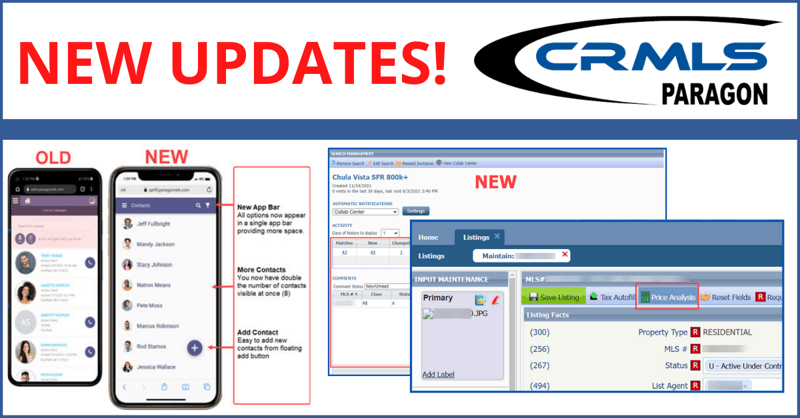
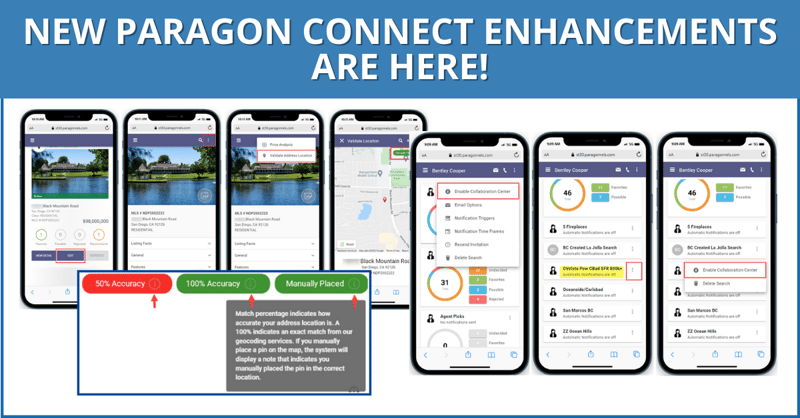
The latest update features new widgets, updated email layouts, and other enhancements to Paragon and Paragon Connect.

Sharing Listings

In Paragon Connect, there are two options to share a listing:

  1. Share with public
    This option uses CollabLink to share listings with the same public-safe options as before. It includes a reminder to users that it only displays publicly permitted fields.
  1. Share with members

This new section is designed for sharing with other authorized Paragon Connect users. Features include:

  • Email
    Send listing reports directly to other agents. Emails sent this way include a Lookup button in the recipient fields (To, CC, and BCC), support selecting one or more agents, and will appear in the Message History for both the sender and related member.
  • Copy Link
    Automatically copy a link to share the Paragon Connect detail view of the listing(s). A confirmation message will appear after copying.


New Widget – Sell Side Tracking

The new Sell Side Tracker widget monitors buyer interest and activity. Add up to three Sell Side Tracker widgets per listing on the dashboard.

The widget tracks:

  • Contact: Assigned contact for the listing
  • Status: Current listing status
  • Days on Market: How long the property has been active
  • Possible/Rejected/Undecided: Buyer interest indicators
  • Total Agent Views: Number of times the agent viewed the listing
  • Unique Agent Views: Individual unique agent views
  • Total Client Views: Total consumer views
  • Unique Client Views: Individual unique consumer views
  • Recommended: Number of times the listing was recommended
  • Open Houses: Scheduled open house count
  • Tours: Number of property tours scheduled
  • Agent Comments: Number of times an agent commented on the listing
  • Buyer Comments: Number of times a buyer commented on the listing
  • Shares via Email: Number of times the listing was shared via email
  • Shares via Facebook: Number of times the listing was shared on Facebook
  • Showing Requests: Number of requested showings

The Sell Side Tracker widget refreshes every 24 hours. Green + indicators highlight new activity.


Redesigned Listing Thumbnail Results

Use the updated thumbnail cards to see more details and listings on the results page.

Unpublished Listings

Scan and manage multiple listings with the new thumbnail layout.


Published Listings

Maintain listings more easily with the enhanced published listing thumbnails.

Thumbnails include:

  • Seller Contact Management: Assign or unassign a seller contact
  • Quick Access Buttons: Launch the listing insights report, edit option, and media gallery directly from the thumbnail photo


Option to Disable Help Tips

Disable help tips from the overflow menu during listing maintenance.


Listing Form Container Behavior

The listing form now expands all containers automatically. Use the search bar to move up specific fields to the top of the page.


Simplified Filtering for Published Listings

Use the listing filter to search and filter specific listings based on select criteria.

Copying Unpublished Listings

The copy listing feature now extends to unpublished listings.

More Recognizable Icons for Opening Search/Listing Modals

The UI now has a magnifying glass icon to open modules and clearly distinguishes dropdowns from modals for advanced search or content selection.


Agent Notification – Emails

Agent notification emails now have an updated look and format.

Email Update – Comments Sent to Agent

When a contact makes a comment, agents receive an automatic dedicated email notification. In the Paragon Connect app, the email notification button links directly to the comments page. In the Paragon Connect, the link opens to the same page in the web-based version of the system.

Categorized Listings Email

Receive an email summary of new categorized listings from the past 7 or 30 days (frequency based on notification settings). For easy identification, each email is labeled with the contact’s name.


Create/Modified Searches for Contacts

When a contact creates or modifies a search, it triggers a standalone email containing the contact’s details, name, and full search criteria. Click the view search button for instant access.

Agent Preview Listing Approval

In Paragon Connect, agents receive an Agent Preview Listing Approval email that displays the number of changes at the top of the page and highlights contact details. Click the Review Listings button for instant access to approve or decline new listings in the client’s search.

Enhanced Document Display in Detail Report & Media Gallery 

In Paragon Connect, distinguish between public and private documents with new labels in the updated Detail Report and Media Gallery, both featuring cleaner layouts.

Open House & Tour Multi-Date Selection

Use the updated calendar to select multiple individual dates when creating tours or scheduling multiple open houses. Note: The individual dates selected do not have to be consecutive.


Collaboration Center – Dashboard Widget Updates

Access widgets more intuitively with the collaboration center dashboard’s new, cleaner layout.


Seamless Deep Linking to the Paragon Connect Mobile App

Click the email link to automatically to see which listings are set to expire in the mobile app.


Save Agent Contacts on Mobile

Save agent contact details directly from the listing detail report page in Paragon Connect. Click the Save to Phone button to open the application with all relevant contact information completed.


Read Paragon's Knowledgebase article for a full list of recent updates


Education

CRMLS offers a variety of resources to educate you on our products and services. Click above to visit the CRMLS training center.

Support

If you need MLS support, please click above or call (800) 925-1525

Compliance

Your listing data is safe, clean, and accurate. Click above to chat live with a CRMLS Compliance representative.


Read Paragon's Knowledgebase article for a full list of updates.

Topics: Announcements, CRMLS

Meet with Paragon Connect-Rep and PSAR CEO for Demo & Discussion

Posted by Communications on Feb 20, 2026 4:30:13 PM

  REGISTER HERE  

blog banner_paragonConnect

The ICE (formerly Black Knight) team is coming to town for the REAL Awards, and they are arriving a day early to host a special session just for PSAR members.


Event Details

This live demo is your best opportunity to learn best practices, ask questions directly to the developers, and get a first look at upcoming features.

  • Date: Thursday, February 26th
  • Time: 12:00 PM – 1:00 PM
  • Location: PSAR Chula Vista (880 Canarios Court, Suite 100, Chula Vista, CA 91910)

If you are still using "Classic" Paragon, you’re missing out on the power of a truly mobile-optimized business. Join Shonda Paul (Director of Customer Engagement, ICE) and Rich D’Ascoli (CEO, PSAR) for a live, hands-on demonstration of Paragon Connect.

  REGISTER HERE  

Why Switch to Paragon Connect?

Paragon Connect isn’t just a mobile version of the software you know—it’s a faster, more intuitive way to manage your business on the go. The team will walk you through the newest tools designed to simplify your daily tasks:

  • Robust Search: Pinpoint local properties with precision using an interface built for speed.
  • Simple CMAs: Generate professional Comparative Market Analysis reports in seconds from your phone or tablet.
  • On-the-Go Management: Maintain accurate listing data and organize client conversations from a single, easy-to-use interface.
  • Maximum Efficiency: Customizable solutions designed to reduce administrative time and keep you in the field.
  • Mobile Friendly App: Add, edit, and full MLS functionality on mobile devices.


Download for Apple or Android

Download_on_the_App_Store_Badge.svg-2          png-clipart-google-play-google-logo-mobile-app-app-store-play-store-label-text-thumbnail-1


Topics: Education, Announcements, CRMLS, Industry

New protection for San Diego homeowners: ending the "permanent" public tour

Posted by Communications on Feb 17, 2026 4:53:15 PM

For years, one of the biggest frustrations for homeowners has been the lack of control over their property’s online presence. Once a house is sold, interior photos—showing everything from the primary bedroom to the home’s security layout—often remain searchable on the internet indefinitely.

Starting February 17, 2026, a new policy is finally putting the curtains back up. The Pacific Southwest Association of REALTORS® (PSAR) is proud to announce a technical solution that will automatically remove interior photos from public search sites once a property sale is finalized.


The power of our partnership with CRMLS

This significant shift in privacy is made possible by CRMLS, the nation’s largest and most recognized MLS. By updating their rules and infrastructure, CRMLS has paved the way for this automated solution. This change ensures that the data being shared with public-facing websites remains relevant to active listings, rather than becoming a permanent archive of a private residence.

As a PSAR member, you and your homeowners benefit directly from the industry-leading standards and technical innovation that CRMLS brings to the San Diego market.


CRMLS and PSAR


The problem: private homes, publicly searchable

Most homeowners assume that when they buy a house, the marketing photos disappear. However, due to how data is shared through IDX (Internet Data Exchange), those photos often stay live on thousands of real estate websites long after the new owners move in.

For residents, this is a legitimate security and privacy concern:

  • Home security: Interior photos can act as a blueprint for bad actors, identifying entry points and the location of valuables.
  • Family privacy: Families are often uncomfortable knowing anyone can virtually walk through their private living spaces via an old listing.
  • Online fraud: Scammers frequently use these persistent photos to create fake rental listings, leading to strangers showing up at a homeowner’s door.

A new standard for San Diego

"We believe that once a house is sold, it stops being a listing and starts being a home," says Claudia Zaker, President of the Pacific Southwest Association of REALTORS®.

Through the leadership of CRMLS and our local partnership, homeowners will now have their privacy protected automatically. Starting in the first quarter of 2026, the data feed used by PSAR members will remove photos as soon as a sale closes.

The result: Every interior photo will be scrubbed from the public data feed. Only the primary exterior shot will remain on record to ensure there is a "front door" photo for historical property records and appraisals, while keeping the inside of the home private.


What this means for PSAR members

This is a first-of-its-kind feature for San Diego, moving the responsibility of data privacy from the homeowner to the professionals. By being a REALTOR® with PSAR, you provide your homeowners with:

  • Automated privacy: They no longer have to spend hours requesting various websites to remove photos of bedrooms or living areas.
  • Increased security: A home's private layout is no longer a public map.
  • Digital closure: Once the sale is over, the public tour officially ends.

"PSAR and CRMLS are taking the lead in San Diego to ensure private data stays private," says Zaker. "We are proud to bring this level of digital protection to our community."


Background and technical rule change

For those interested in the specific regulatory language, Rule 19.2.4 - Display Content (IDX) has been revised. While the rule is now official, it will not be enforced until CRMLS completes the technological project of removing non-primary photos from the IDX payload and notifying all IDX vendors of these changes.

The revised rule now states:

Display Content. Participants and Subscribers shall not display confidential information fields, as determined by the MLS in the MLS’s sole discretion, such as that information intended for Buyer Brokers rather than consumers. Participants and Subscribers shall not display any photo or media other than the Primary Photo for any CRMLS Listing Record in a status of Closed/Leased, Expired, or Canceled.


Topics: Education, Announcements, Brokers/Managers, CRMLS, Industry

Stand Out and Close Faster with RealReports — FREE benefit Available now

Posted by Communications on Jul 3, 2025 2:40:22 PM

blogbanner_250710_RealReports_BLOG-1

Delivering real value to clients is more important than ever. RealReports is an AI-powered property insights tool that helps agents save time, reduce risk, and present themselves as knowledgeable professionals. Now available at no cost through your CRMLS REcore dashboard, this tool gives agents a competitive edge - starting today.

Often called the “Carfax for homes,” RealReports pulls together zoning, permits, hazards, climate risks, school data, and more into one easy-to-share report. It also supports document analysis, lead generation, and even answers client questions using a built-in AI co-pilot named Aiden.

Why Use RealReports?

  • Fast, accurate property insights in seconds

  • Stronger buyer and seller presentations

  • Smarter offer strategies with less manual research

  • Branded, client-friendly reports that set you apart

  • Built-in lead capture and follow-up tools

“When your client can ask an AI about wildfire risk or school ratings while standing in the kitchen at a showing—and it’s your branding on the screen—that creates trust.”
RealReports User


For Buyer Agents: Save Time and Build Trust

Before Showings
Skip wasted tours. Run a Snapshot or Buyer Report to flag flood zones, permit issues, or climate risks before you leave the office.

During Tours
Access more property data than the MLS provides—plus tools to guide your client’s decision-making in real time.

When Writing Offers
Eliminate hours of due diligence. RealReports puts ownership history, zoning info, insurance flags, and inspection risk indicators in one place—supporting stronger offers and fewer surprises.

Relocation Clients
Use RealReports to introduce out-of-area buyers to neighborhoods with interactive data on schools, crime, and local trends.


For Listing Agents: Win More Listings and Engage More Buyers

Listing Presentations
Bring a Seller Report to your first appointment. Show potential clients that you use premium tools and deliver maximum exposure.

Marketing & Open Houses
Use QR codes from the Seller Report on signs, flyers, or social media. Let buyers explore details via AI—and capture lead data automatically.

Client Retention
Stay in touch with past clients. Send a fresh report every year to show how their property value or local risks may have changed.

Lead Farming
Use Snapshot Reports to re-engage CRM leads with personalized info. Every view is tracked. Every question they ask Aiden is saved.


Powered by Real Data, Backed by PSAR

This tool is made available through Pacific Southwest Association of REALTORS® (PSAR) at no cost to members. It reflects PSAR’s commitment to helping agents grow their business, improve client service, and stay ahead in a changing industry.

“RealReports empowers agents with fast, reliable property insights that help them stand out in today’s market. PSAR added this tool to give members an edge with accurate data and AI-powered support.”
Rich D’Ascoli, CEO, PSAR


How to Get Started

  1. Log in to your PSAR/CRMLS Dashboard (REcenterhub)

  2. Click the red “+” icon and add RealReports (or follow this 20 sec. video) 

  3. Find RealReports tile and pull your first report in seconds

📺 Watch a Quick Demo of RealReports:
https://www.youtube.com/watch?v=hEVJ1tuX0Nw

🎓 Full Tutorial Hub:
https://realreports.notion.site/RealReports-Education-Hub-c80efead519340a188873a58e3a6b0f0


This tool helps you work smarter, build trust faster, and show your value clearly. Use it before showings, at open houses, in buyer consults, or as part of your listing pitch. The more you use it, the more clients will see the difference.

Need help? PSAR staff can walk you through setup or usage—reach out anytime.

Topics: CRMLS, Marketing

find the CRMLS Compliance and Support Chat

Posted by Communications on Jul 24, 2024 2:27:15 PM

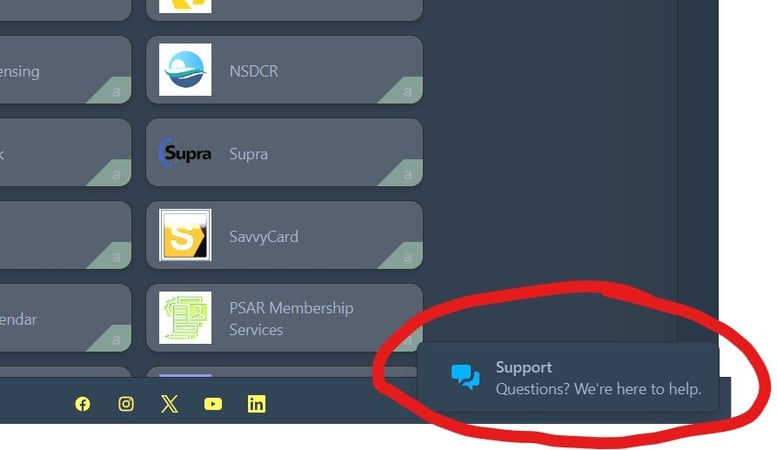
If you are looking to Chat or File a Ticket with CRMLS Compliance or Support, it's moved.  Here is a quick video Tutorial on where to look.

Click here to see a quick video on where to look.  

hide the chat-1


Topics: Announcements, CRMLS

Important - Compensation Field Removal from CRMLS on August 13th.

Posted by Communications on Jul 10, 2024 5:39:08 PM

Effective August 13:

  1. Removal of Compensation Fields
    • From Matrix, Paragon, and Flexmls.
    • CRMLS Rules and Policy changes go into effect.
    • The concession field at Close will include a category list.

Key Points:

  • Reason for Removal:

    • NAR settled the Sitzer/Burnett case regarding MLS commissions.
    • Compliance with the settlement requires MLS systems to remove all Compensation fields.
  • Impact on Active Listings:

    • Compensation fields for Coming Soon, Active, Hold, and Withdrawn listings will be removed.
  • Historical Listings:

    • Compensation fields for Active Under Contract, Pending, Closed, Expired, and Cancelled listings will remain but cannot be edited.
  • C.A.R. Forms:

    • Release of updated forms postponed. Updates will be provided.
  • Payment Methods Post-Removal:

    • Buyer's Broker compensation can be included in the buyer's offer.
    • Payment details can be included in the Escrow Instructions if using the C.A.R. Residential Purchase Agreement.
  • CRMLS Rules & Policy Changes:

    • Rule 7.15: Renamed to No Offers of Compensation in the MLS.
    • Rule 7.19: Renamed to No Disclosure of Listing Broker Total Commission.
    • Rule 9.1: Renamed to Showings.
    • A signed Buyer Broker Agreement is required before showing a property.
    • View all changes here.
  • Reporting Seller Concessions at Close:

    • New required fields: Closing Costs, Property Improvements, Financing Costs, Buyer Broker Fee, Other, and Total Calculated.
  • Difference Between Concessions and Compensation:

    • Concessions allow buyers to choose how money is spent, supporting a consumer-centric model. Watch the Concessions vs. Compensation video for more information.
  • Staying Updated:

    • Visit the CRMLS Resource Center frequently for updates and information.

compensation


Topics: CRMLS

New Optional Fields Make Agent Communication easier and Direct

Posted by Communications on May 30, 2024 3:21:21 PM

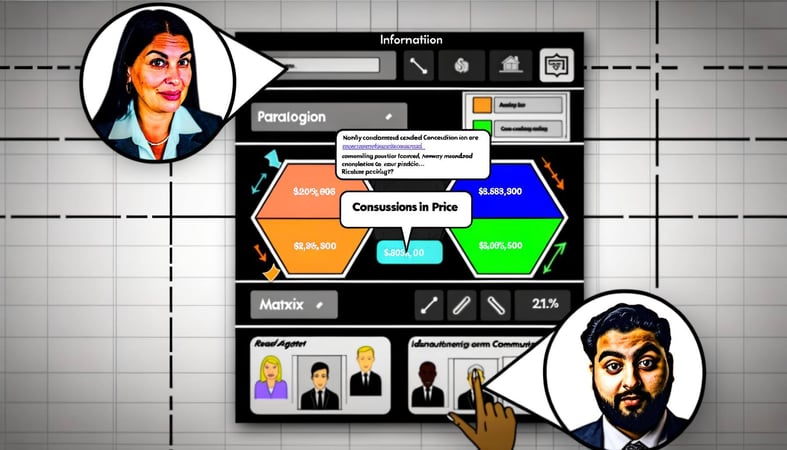
As of May 29, all CRMLS Paragon and Matrix now feature optional "Concessions in Price" (CiP) fields. These fields help communicate the seller's willingness to offer concessions, providing sellers an edge and giving buyers a clearer idea of a property's total cost. Learn how to navigate the CiP fields in this guide and find them in your MLS system here:

Last year, nearly 40% of CRMLS closed listings included some form of concession, such as broker fee payments or repair costs. Previously, this information was only available after a listing closed. Now, active listings will display concession details, motivating sales and making it easier to find the perfect property.

For sellers, the new fields allow highlighting a willingness to offer concessions. For buyers, identifying listings with potential incentives helps overcome financial obstacles. The CiP fields benefit everyone.

New Concessions in Price (CiP) Fields:

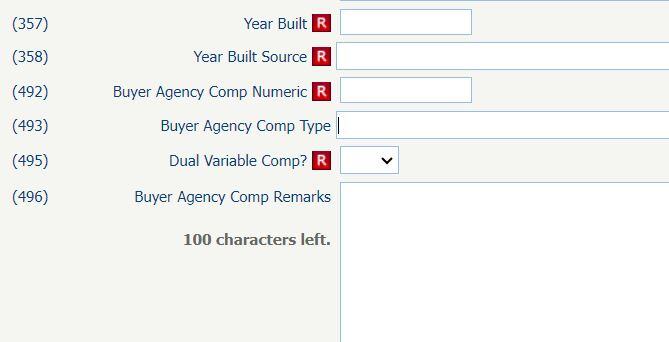
  • Concessions in Price: A text box for numerical input only, representing the total potential concessions.
  • Concessions in Price Type: Classify the amount as either a dollar amount ($) or a percentage (%).
  • Seller Consider Concessions?: A simple Y or N field. If "Y," additional information appears when hovering over the help (?) icon, indicating that the seller may consider a buyer concession in an offer.

By CRMLS launching these optional fields before the deadline, subscribers will gain valuable real-world implementation experience. This early access allows for necessary adjustments based on practical feedback, ensuring a smoother transition when the fields become mandatory.

For questions, please refer to the FAQ.

Remember, the CiP fields are optional, and concessions are not mandatory.


Topics: CRMLS

NEW - Optional Concessions In Price MLS Field.

Posted by Communications on May 15, 2024 3:26:14 PM

Concession_240515_Blog (1)

Starting May 29, users will have access to the optional Concessions in Price (CiP) fields when creating a listing. 

The facts:

  • In 2023, nearly 40% of closed residential listings included some form of concessions, including the seller paying for escrow and title fees, loan discount points, and repair and/or upgrade costs.
  • 15% of those closed residential listings in 2023 had some sort of advertisement for Concessions being offered in the Private Remarks section of the listing.

With such a large amount of our user base actively offering concessions, we saw an opportunity to create a specific set of dedicated fields for the benefit of our users and their clients. These new CiP fields will allow agents to convey their willingness to offer concessions at the listing level, thus allowing for clearer communication and cooperation between agents and brokers. 

The new fields benefit all parties:

  • Listing agents and sellers
    Will gain a dedicated space to advertise/market their willingness to consider concessions at the listing input level
  • Buyer's agents
    Will be able to better serve their clients with up-front information on which listings will consider concessions to assist in transaction fees 
  • Homebuyers
    Enhanced transparency on which listings are willing to consider concessions to assist with their financial needs  

What's changing?
Currently, concessions are recorded only at the close of a transaction with a mandatory requirement to state the amount of any concession. The new, more descriptive CiP fields will be available for input at the listing level.

To be clear, the new CiP fields will be optional and only reflect a client's willingness to consider concessions. Details regarding the concessions that may be offered must be discussed outside of the MLS and after a written agreement is signed.

The new fields will be titled: 

  • Concessions in Price: a text box for numerical input only. This amount should include any and all potential concessions in a single total amount.
  • Concessions in Price Type: classify the number above as either $ or %
  • Seller Consider Concessions?: either Yes or No. If Yes, then the listing will include the phrase “A Seller may consider a buyer concession if made in an offer.”  

As of May 29, the new fields in your Matrix system will appear here:

Additional CiP Resources
FAQs
The Facts About Concessions Infographic
Concessions in Price Infographic


Topics: CRMLS

HomeSnap-Pro Becomes Homes-Pro

Posted by Communications on Oct 13, 2023 4:46:10 PM

Homesnap pro is on the way out

The Homesnap app, which is a listing search product for both listing and buyer agents, will be changed to the Homes Pro app, a LISTING-Agent search and advertising platform. While Homesnap is still currently available, the Homesnap app will fully become the Homes Pro app on October 23.   

This update comes from Homesnap: Most elements of Homesnap will forward to the Homes Pro app or redirect to Homes.com, regardless of whether or not you're a CRMLS user. In fact, many MLSs that had relied upon Homesnaphomespro app have already made the transition to Homes Pro, so we're hoping for an easy change to the different platforms. 

When opening the Homesnap app or accessing the website, you'll see this splash screen informing you of the switch taking place on 10/23.

CoStar's business model is to steer all leads to the listing broker or agent and not to the buyer's agent working with a client. The business plan is to see advertising to the listing agents. 

Finding a suitable replacement for a familiar tool can be a daunting task, and the process of replacing it is no easy feat. However, below is a comprehensive list of comparable product solutions tailored to your particular MLS system. Carefully review each offer and determine whether the Homes Pro app or another CRMLS core product is a better fit for you.  Advantages of these tools include the client portal, the ability to Add/Edit, 

Paragon App Comparison
Matrix App Comparison

Learn more about the Paragon Connect Moblie Web Site

Learn more about MLS Touch
Learn more about the CRMLS App

CoStar's move to discontinue Homesnap came nearly three years after CoStar acquired Homesnap for $250 million in 2020, initially intending to enter the residential real estate market. In 2021, CoStar acquired Homes.com for $156 million and decided to make it their primary consumer brand. 

By the end of the year, Homesnap's website will redirect home searchers to Homes.com, and eventually, Homesnap will be completely phased out.

For now, Homes Pro will remain free for agents and multiple listing services (MLSs).


Topics: CRMLS, PSAR Benefits, Industry, Paragon

Improve your client's tour experience with new Live buyer tours.

Posted by Communications on Mar 27, 2023 3:45:59 PM

What are live buyer tours?
If you use Cloud CMA, then you’re likely already familiar with buyer tours, the reports that build on MLS data to give your buyer clients a better sense of what they’re looking at. In fact, buyer tours have become one of the most popular types of reports in Cloud CMA overall! 

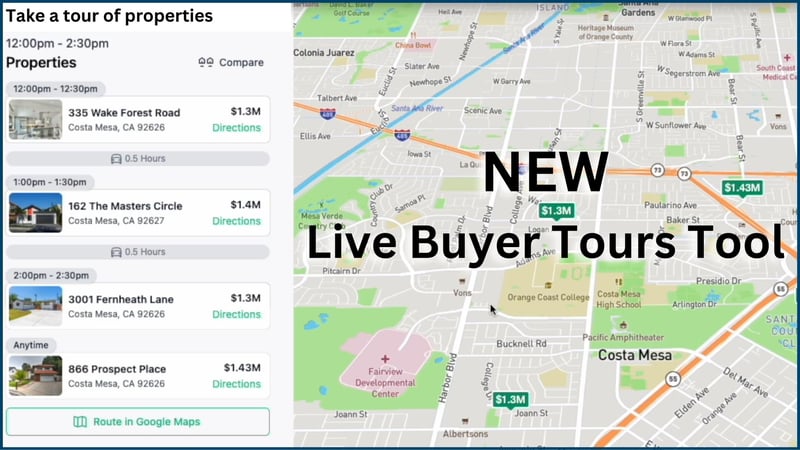
Live buyer tours build on the existing functionality to turn static reports into dynamic ones—with real-time data that you and your buyers can easily read on any device. So you get a new way to show off properties, and your clients get live access to the most relevant information about their favorite listings. 

What can your clients see with live buyer tours? 

Their list of showings, organized by time 
Details like drive time and directions 
Feedback fields that share directly with their agent 
And more! 
 

Why the change? 
Home shopping and touring habits aren’t what they used to be.  Now, people have pocket computers with them constantly, so they can browse listings, request showings, get directions, whatever they need to do—all from the palm of their hands. 

Paper tours are outdated.  With live buyer tours, your clients have the technology on hand to interact with you and tour property more seamlessly. It’s a subtle contributor to their overall experience; they’ll appreciate the convenience and thoroughness of the information you provide. 

 
Here is how it works.


Topics: Announcements, CRMLS, Technology, Industry, Paragon